Authentication
Access to the PQFORCE API is secured using Bearer Token authentication. All API requests must be authenticated to ensure that data access and operations are executed in a controlled and auditable manner.
Basic Principle
Bearer tokens are created by calling the following endpoint:
POST /API/V2/ACM/ApiToken/Create?tenantalias={tenantalias}
This request initiates the creation of a new API token but does not immediately activate it. Instead, the server responds with a URL that must be opened by a PQFORCE user. At this URL, the user explicitly authorizes the generated token and specifies its validity duration. This authorization step ensures that API access is always tied to a real user identity and complies with PQFORCE’s security and permission model.
Once authorized, the bearer token can be used to authenticate API requests by including it in the Authorization HTTP header:
Authorization: Bearer <token>
All subsequent API calls executed with this token are performed in the name of the authorizing PQFORCE user. As a result, the token inherits the user’s permissions and access rights, and all actions are subject to the same authorization rules, data visibility, and audit logging as if the user were performing the actions directly in the PQFORCE client.
This also implies that if the user is deleted or if their access rights are revoked, the token becomes invalid and can no longer be used. This principle can be leveraged to manage entire groups of tokens by controlling the permissions or lifecycle of the associated users.
Tokens remain valid according to their configured lifetime and can be revoked at any time by the user or an administrator. Clients should therefore be prepared to handle authorization errors and renew or reauthorize tokens as required.
Example
In the following example, a new API token is requested from the training tenant on our DEMO server.
To request a new token, the following endpoint is called:
curl.exe -X POST "https://demo.pqforce.com/API/V2/ACM/ApiToken/Create?tenantalias=training" `

-H "Content-Type: application/json" `

--data-raw '{ \"application\": \"curl\" }'
The server responds with a payload similar to the following:
{

    "apiToken": <token>,

    "authorizationUrl": "https://demo.pqforce.com/training?selid=<selid>&authtokenid=<tokenid>&seltype=ApiTokenList&id=ADM&type=Module",

    "authorizationDeadline": "2025-12-31T11:00:00.000Z"

}
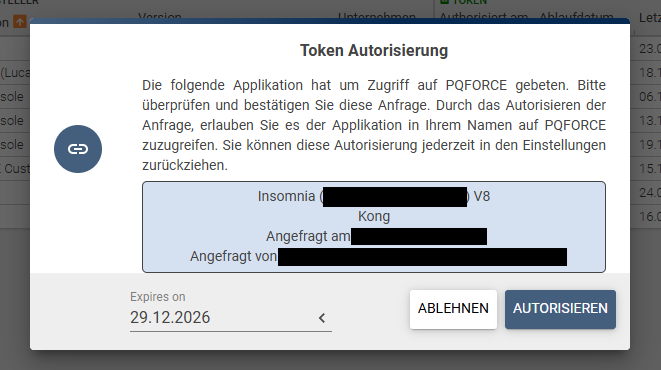
By opening the provided authorizationUrl, the user is first prompted to log in to the corresponding tenant. After successful authentication, the client displays a dialog titled “Token Authentication”, where the user can choose to authorize or reject the generated token. The dialog also contains a date selection field that allows the user to define the token’s expiration date.
Once the token has been authorized, it can be used in subsequent API calls. These calls are executed with the permissions that the authorizing user currently has.
Example request using the authorized token (Windows Powershell):
curl.exe `

-X GET https://demo.pqforce.com/API/V2/PM/Project/<projectid> `

-H 'Authorization: Bearer <token>'