Core Concepts in PQFORCE
This section provides a brief introduction to the core concepts in PQFORCE that are relevant when working with the API. It is intended to give developers and integration specialists a conceptual overview of how data is structured and related within the system. It is neither a complete functional description of PQFORCE nor a user guide.
In general, we strongly recommend that developers become familiar with the PQFORCE application itself before starting to implement integrations. Many aspects of the data model, permission handling, and business logic are best understood in the context of the user interface and real-world usage scenarios. Exploring these concepts within the application helps reveal the full capabilities of PQFORCE and prevents incorrect assumptions when working with the API.
Object Identifiers
Every object in PQFORCE is uniquely identified by the combination of its type and ID. The object type defines the structure and semantic context of the object within the system. For most parts of PQFORCE, object types are predefined and cannot be changed. One notable exception is the group of resource types, which are configurable and may therefore differ from tenant to tenant.
The ID is an arbitrary 32-character string that uniquely identifies an object within a tenant. When a new object is created, the ID may either be explicitly provided in the API call or automatically generated by the system, depending on the endpoint and use case. In scenarios where IDs are set manually, we strongly recommend using UUIDs (version 4 or higher) to avoid collisions.
To support this, PQFORCE provides the endpoint
GET /API/V2/CLF/Uuid/New/{count}
which can be used to generate one or more unique IDs. If identifiers from an external system need to be preserved, we recommend using the concept of Third-Party References, which allows external IDs to be stored and mapped without overloading the internal object ID. This concept is described in more detail in - for example - the PQFORCE community.
Object Types
Based on our experience, the following object types are among the most relevant when working with interfaces and integrations:
- Project – Project
- ProjectPortfolio – Project portfolio
- Scenario – Planning scenario (Gantt) of a project
- Phase – Task, milestone, or folder within a planning scenario
- ProjectCostsPosition – Cost position
- HRM-RES-TYP-OU – Organizational unit (configuration-dependent)
- HRM-RES-TYP-EMP – Employee (configuration-dependent)
When reading, creating, or updating instances of these object types via the API, the server returns or expects a JSON representation that typically includes the following attributes:
- type – Object type
- id – Unique object ID
- name – Name displayed in the client
- code – Optional code, shown as an identifier in the client (often referred to as a pseudo-ID)
- description – Optional description, displayed in the client
- properties – Array of property values; the available properties depend on the object type and tenant configuration
Relations between Objects
In PQFORCE, object instances are connected through well-defined relations. Each relation has a fixed type that defines its name, direction, origin object type, target object type, and additional characteristics.
The system provides a broad set of predefined relation types that reflect common project and organizational structures and cannot be modified. Typical examples of such predefined relation types include relations between project portfolios and their projects, projects and their scenarios, and scenarios and their phases. In addition, PQFORCE allows the configuration of custom relation types, particularly to link projects, project portolios, todos, organization units and meetings with resources. Common examples are relations such as project manager, sponsor, resource manager, or organizational unit owner.
It is important to understand that almost every view presented in the PQFORCE client represents a consolidation of data from multiple related objects. Consequently, integrations usually need to work with more than a single object type. For example, exporting a project from PQFORCE typically requires not only reading the project object itself, but also its related subobjects, such as scenarios, phases, and potentially additional linked data. Understanding these relationships is therefore essential when designing robust and complete interfaces.
JavaScript Automations
For automation tasks that are based solely on data already stored in PQFORCE, the platform provides built-in automation capabilities through so-called JavaScript Sandboxes. These sandboxes offer a secure execution framework that allows you to read and manipulate PQFORCE data directly via the API from within the system itself, without the need for any external software or integration layer.
If your goal is to automate internal processes in PQFORCE, JavaScript Sandboxes are typically the simplest and most reliable option. They eliminate external dependencies and allow automation logic to run close to the data, ensuring better performance and stability.
For a deeper introduction and practical examples, please refer to our Webinarsand the PQFORCE Community.
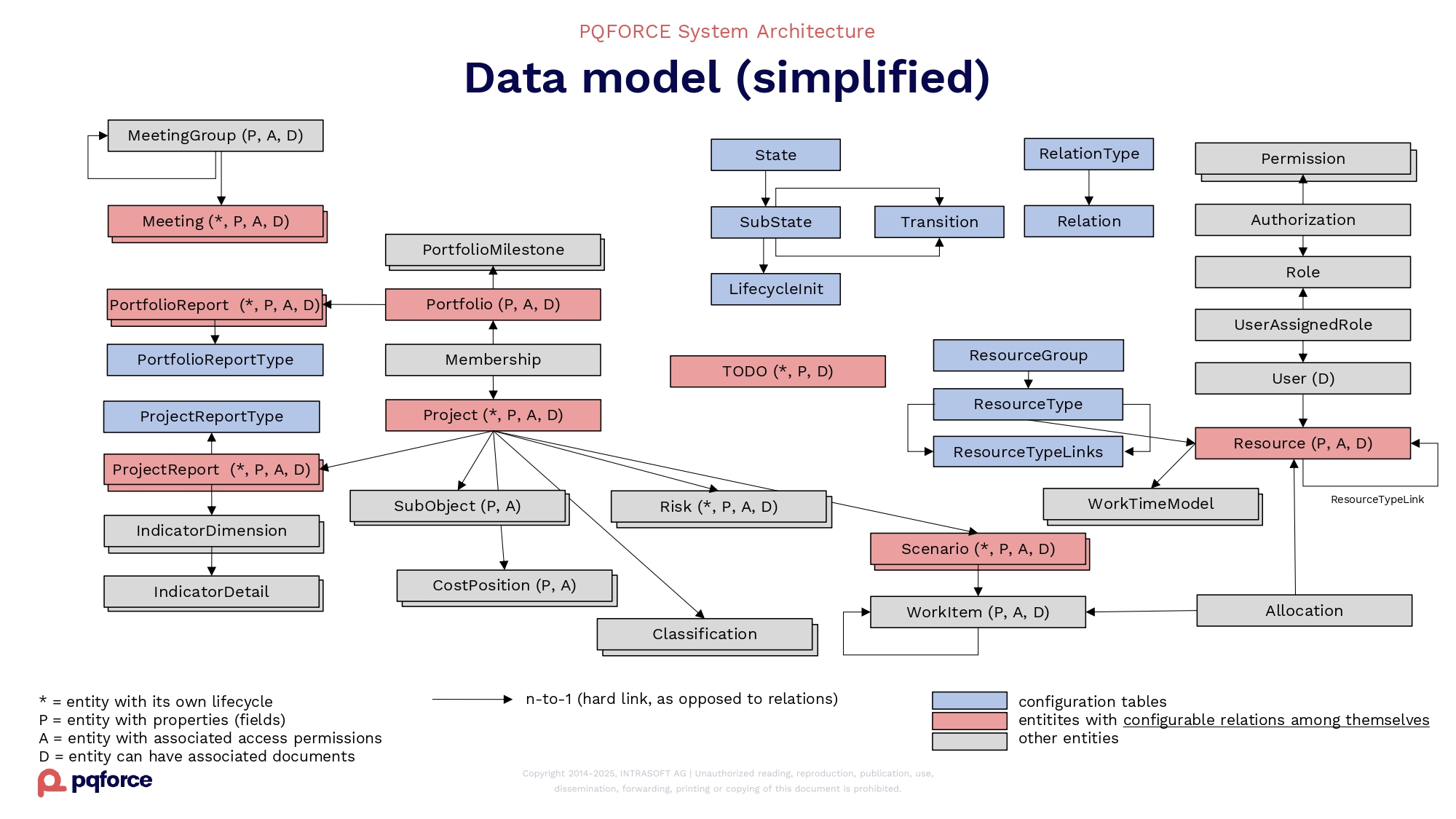
Data Model
The following picture shows a simplified data model of PQFORCE.