Settings
This view contains global settings that are valid throughout the system.
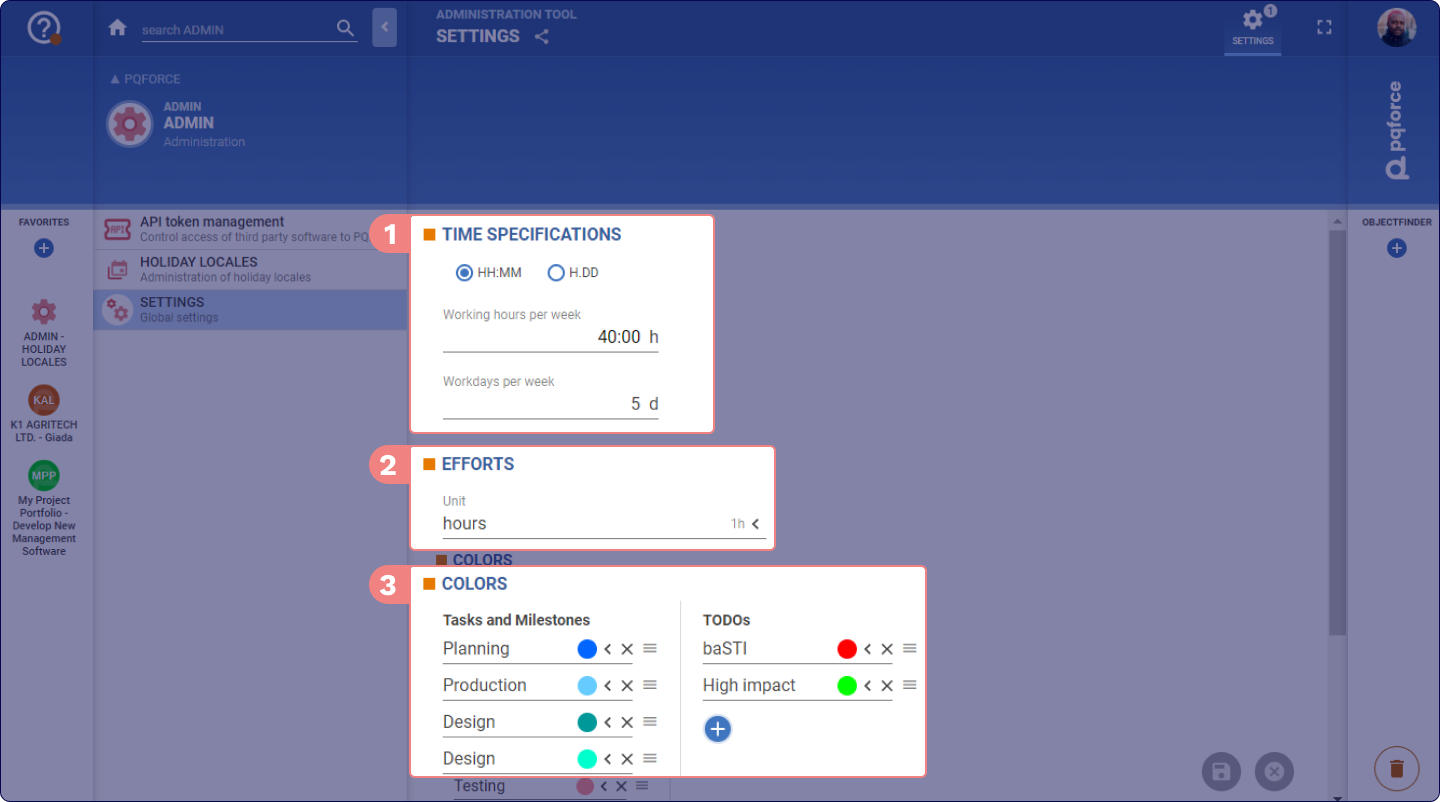
Workspace
1 TIME SPECIFICATIONS
The settings section determines how time is displayed in the PQFORCE system and how it is converted between different units (e.g., weeks <-> days).
The format options include displaying hours in either minutes or decimal values.
The working hours per week field allows to define a number of hours that constitute the Full-Time Equivalent for the system. This value serves as the basis for calculating time models and managing availability.
Additionally, the configuration allows for adjustment of the number of working days per week as required.
2 EFFORTS
In this section, under Unit, the default time unit used for effort in the system can be set, from a selection of hours, days, weeks, months or years. However, when this setting is changed, the values themselves are not adjusted, only a conversion to the new unit takes place.
3 COLOURS
Within this segment, colours are defined for tasks, milestones, and TODOs, providing a means for distinct visual identification of these objects.
The addition of a new colour can be added by selecting Add a colour. Existing colours or their associated names are subject to modification by interacting with the colour circle or the name field.
An existing colour can be removed by clicking the X-symbol  next to the colour and reorganised by dragging the three-line icon to its right.